
Roadster Police Chase ↗
Police pursuit and airborne escape · Driver + car · About 15 seconds · 9:16
Your car. Your driver. An impossible getaway. Turn the flying Roadster concept into a personal video with three ready-made scenes and your own photos.
Template references · Your result uses your uploaded photos.
Find your flight path.
Watch the city launch, highway pursuit and curved-ramp performance. Each reference has a different rhythm and its own photo requirements.
Police pursuit and airborne escape · Driver + car · About 15 seconds · 9:16
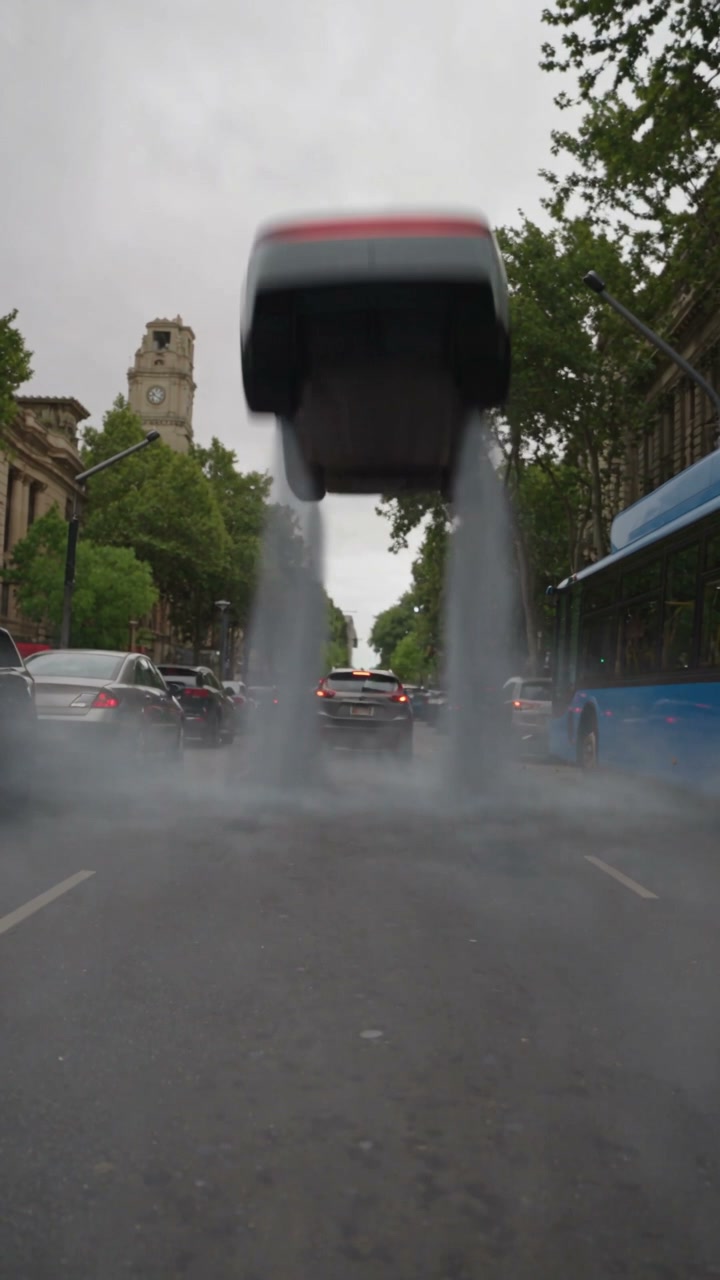
City queue and sudden takeoff · Driver + car · About 13 seconds · 9:16
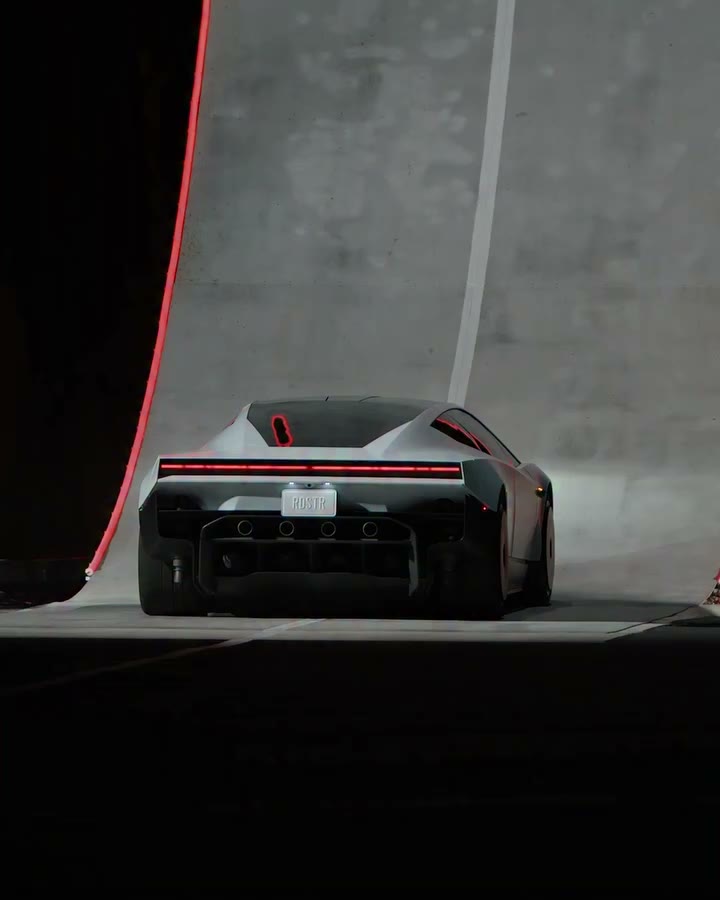
Curved ramp, rotation and landing · Car only · About 17 seconds · 4:5
Reference footage shows the selected scene. A generated interpretation will depend on your photographs and can vary in detail.
From a photograph to a flight concept.
The scene is prepared. Your photographs supply the people and vehicle you want to see in it.
Play the Roadster AI reference before choosing a scene. Traffic Escape turns a familiar commute into a flight; Police Escape follows a pursuit; Ramp Stunt puts the vehicle through a complete maneuver. The preview shows the actual sequence your selected template will follow. Choosing or watching a template does not submit a generation.
Use Driver photo for the person and Car photo for the vehicle in either escape. The ramp needs only a car. Roadster AI keeps these roles separate, so you can pair a portrait with a vehicle photographed somewhere else. Pick images with a clear subject and permission to use the people and material pictured.
Sign in with Google, confirm the scene and credit quote, then submit once. Review the result in My creations, including the cabin, takeoff and landing. The completed result shows how your photos were interpreted.
A familiar driver and recognizable vehicle make an impossible commute personal. Roadster AI gives each subject a separate reference. A portrait supplies the visible person, including hairstyle and clothing, while a vehicle photograph supplies the body shape, paint and wheels. You do not need to stage a photograph of the person sitting in that car. Police Escape and Traffic Escape both move between interior and exterior views. That gives the driver a role in the story as well as putting the car on screen. Their fixed references supply the road, surrounding traffic, camera cuts and action. The photos change the leads; they do not provide extra cast slots for a police officer, bus passenger or background pedestrian. Roadster AI suits a personal edit, an agreed fictional scene with a friend, or a character-and-car concept. A single photo cannot define every hidden surface or facial angle. Faces, reflections and fine trim can vary between shots.
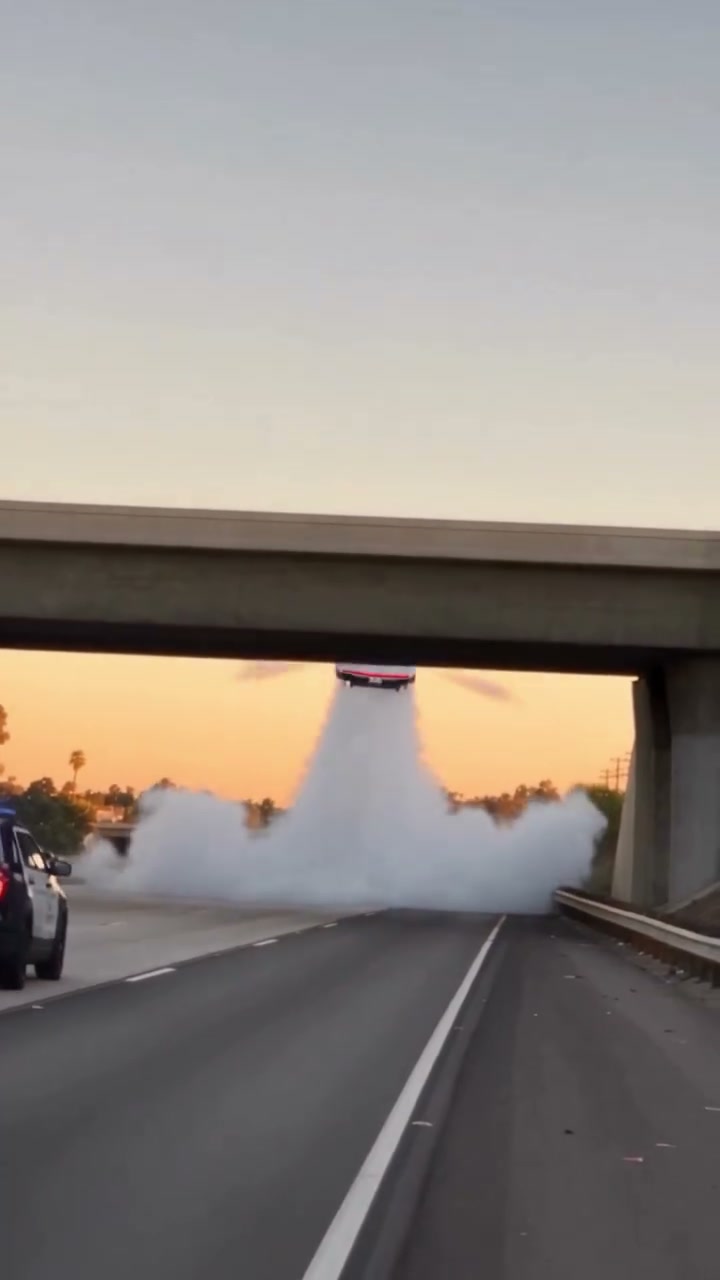
Traffic Escape is built around anticipation. The car begins among other vehicles on a city street, then leaves the queue behind. The return to the cabin makes the driver reaction part of the payoff. Choose this Roadster AI template when the joke is about escaping an ordinary delay, or when you want the person and their outfit to remain central to the clip. Police Escape has a faster action-film rhythm. A highway pursuit, an overpass and an airborne maneuver lead back to the driver. The reference includes a face-covering moment, so the reveal follows the existing scene timing. This choice suits fictional chase edits. A familiar car becomes the lead vehicle while the police and supporting vehicles retain their roles. Ramp Stunt focuses entirely on the car. It follows the approach to a curved ramp, the climb, rotation and landing. Roadster AI asks for one vehicle photo here, with no driver upload required. The 4:5 frame has more width than the two 9:16 escape scenes, which helps the vehicle remain readable as it rotates. Choose it when the car itself should carry the whole performance.
A flying car video has several moving parts: the launch, the camera angle, the transition between shots and the point where the vehicle meets the ground again. Roadster AI uses a fixed reference to keep that sequence together. You choose among complete scenes instead of writing separate instructions for every camera movement. The form contains no free-text prompt or model menu. Roadster AI keeps each reference’s location and sequence. A new car photo does not replace the city, change the ramp or add another stunt. Watch the preview to choose a movement that fits your idea. All three templates are configured to restore the reference soundtrack after the replacement visuals are created. The driver photograph does not produce a new voice, personalized dialogue or lip-synced narration. Listen to the preview before deciding whether its sound fits your intended edit. You can make separate editorial changes to a downloaded result using media you are allowed to use.
The two escape references are 9:16, with Traffic Escape running about thirteen seconds and Police Escape about fifteen. Ramp Stunt is roughly seventeen seconds in 4:5. Roadster AI follows the selected reference rather than offering a duration slider or an aspect-ratio switch. Its current output configuration is 480p; the dimensions of a preview file do not promise a higher-resolution download. For a Roadster AI social post, choose the cabin-led escape or vehicle-focused ramp to fit your story. Preserve the full 4:5 ramp frame when editing into a 9:16 canvas; filling the screen by cropping can remove wheels or the landing area. Review a finished Roadster AI video at normal speed and pause at the moments that matter: the driver reveal, the first airborne frame, the rotation and touchdown. Small badges, wheel spokes, hands and license-plate text can change during motion. Choose a result for its recognizable subjects and coherent sequence. An AI-generated flight is creative entertainment and should not be presented as vehicle testing or evidence of real performance.
The controls stay close to the creative choices that change your result.
Pair a portrait with a separate vehicle image for either escape. Keep the ramp entirely vehicle-focused with a single upload.
Inspect the reference before preparing a take. The launch, shot order and ending already belong to the selected scene.
Use the preview sound control to hear the audio that the template is configured to restore. Your portrait does not create a new voice.
Follow progress in My creations, then review your finished video privately. Check the whole clip before you publish.
Planned video packs
Planned prices for one, three, or five videos. Purchases are closed, so these packs cannot be bought.
Give one favorite car its own impossible scene.
$9.90USD · 1 video$9.90 per video
Explore the chase, city escape and ramp performance.
$19.90USD · 3 videos$6.63 per video
Try different vehicles, drivers and creative pairings.
$29.90USD · 5 videos$5.98 per video
Planned packs cover the three 480p scenes. Generation is currently available to accounts with existing credits. Signing in does not include a free video.
Browsing a template never creates a purchase. See our refund policy for the current purchase status.
Answers about the studio, its current availability and the limits of a template edit.
Roadster AI is an independent photo-based flying car video studio built around three fixed scenes. Two scenes pair a driver portrait with a vehicle image; the third uses just a car image for a ramp stunt. The templates supply movement and editing. Google sign-in, required uploads, and video generation are available. Purchases are closed, and a new account does not include a free video.
Roadster AI is not affiliated with Tesla. Tesla Roadster AI describes a creative video concept people search for, and does not indicate an official partnership. The scenes are fictional edits. This website does not sell vehicles, take vehicle reservations or certify flying-car capabilities.
Yes, the vehicle photo guides the replacement car. A recognizable body shape and clear wheels give the template useful visual information. A very different silhouette can be harder to maintain through the reference movement. There is no guarantee that badges, numbers, mirrors or hidden surfaces will be recreated exactly.
Police Escape and Traffic Escape each require one person photo and one car photo. Ramp Stunt requires only the vehicle. Keep each intended subject separate and use the labeled fields. You do not need a professional driving photograph, a car interior portrait or a picture of an actual jump.
The scene instructions are already prepared. Select a reference, then supply the required photos. This page does not expose a custom prompt editor, replacement reference-video upload or new camera controls. The scene you preview is the scene being selected; a new photo changes its lead subject.
The two escape scenes use the same driver and car roles. Switching to Ramp Stunt uses the car while the driver can remain available during the current visit. A saved ramp draft includes the photos used by that template, so it does not preserve an unused driver image. Check the selected scene before continuing.
The studio previews are the fixed reference templates. The labeled community examples illustrate variations supplied with the source project; they are not verified outputs from this website. Your own result is available in My creations after your generation completes. Compare the reference with the completed clip rather than treating a preview as a guarantee.
The selected template determines its approximate duration and reference audio. There is no in-page timeline, voice cloning or music picker. If you need a longer montage, different narration or a different crop, those are separate editing steps after download. Check that any replacement audio and imagery are permitted for your use.
Completed videos for the signed-in account appear in My creations. Check a running task there before starting another request. Watching a reference does not create a saved video or a generation task.
Confirm that the driver and car remain recognizable through the cuts, and that the landing looks coherent. Review faces, hands and vehicle details as well as the overall motion. Share it with an AI or fictional context when viewers could mistake it for real footage. Permission to use a photo does not automatically grant permission for every soundtrack or brand element.
A commute with an unexpected exit, a chase that leaves the road, or a car-only ramp performance. Start with the reference that fits your idea, then prepare the matching photos.
Explore the flight templates